10 min. read
“Web-based SCADA” is often used as shorthand for several different changes. It may mean replacing installed operator clients with browser sessions. It may mean moving engineering or reporting tools to a central application server. It may describe remote access, hosted infrastructure, or a platform that uses web technologies while every server stays inside the plant.
Those choices have different effects. Browser delivery can reduce installed-client maintenance and make authorized access easier to scale. Central services can simplify version control. Yet session handling, identity, certificates, network segmentation, failure behavior, endpoint governance, backup, and recovery still need engineering.
The comparison should therefore start with functions and boundaries rather than “web versus desktop.” Map where deterministic control, supervisory commands, visualization, alarms, history, engineering, reporting, integration, and remote viewing will run. Then evaluate how each option behaves during normal operation, failure, maintenance, and recovery.
Separate client technology, hosting, and control authority
A traditional SCADA architecture commonly uses installed operator or engineering applications connected to local or centralized servers. A web-based architecture delivers selected interfaces through browser technology. Neither description states whether servers are on premises, at an edge site, in a data center, or in a hosted environment.
Web-based SCADA: A supervisory environment that delivers user or engineering interfaces through web technology without inherently defining server location, data location, or control authority.
Cloud-hosted SCADA answers a different question: where some application or data services run. An on-premises system can use browser clients, while a hosted service can still depend on local gateways, controllers, and safety systems. Treat “web-based” and “cloud” as separate fields in the architecture decision.
Control authority needs its own map. Browser access to a trend is not equivalent to browser authority to issue commands. Specify which roles can observe, acknowledge, configure, or control; identify the server that enforces each decision; and define what happens when a session, network path, identity service, or application component fails.
Compare endpoint deployment and maintenance
Installed clients place application components, drivers, configurations, or runtime dependencies on each endpoint. This can support tightly controlled local workstations, but version consistency and replacement may require endpoint-by-endpoint work. Compatibility with operating systems, graphics, peripherals, and security tooling becomes part of the lifecycle.
Browser clients can reduce the amount of application software installed on user devices. Central deployment may make interface updates easier to distribute and can support multiple authorized device types. The benefit varies by implementation because browsers, operating systems, certificates, kiosk settings, policies, and endpoint controls still require management.
Thin client: An endpoint that relies primarily on centrally hosted application services instead of maintaining the full SCADA application and configuration locally.
Engineering deserves separate evaluation. A browser-based runtime does not guarantee browser-based configuration, version control, testing, or deployment. Ask where engineering tools run, how concurrent changes are controlled, how releases move between environments, and how source files are recovered. Compare the full change workflow rather than the operator screen alone.
Operator workstations may also need local functions such as multiple displays, specific peripherals, audio, hardened kiosk behavior, or defined offline responses. Test the representative endpoint configuration instead of assuming that any standards-compliant browser provides equivalent operation.
Compare availability, latency, offline behavior, and recovery
Availability depends on the complete service chain: endpoint, application service, data service, identity, network, gateways, controllers, time sources, storage, and recovery mechanisms. A centralized architecture can reduce configuration drift but may concentrate dependencies. A distributed architecture can preserve local operation but increase the number of components to maintain.
Failure domain: The set of functions and users affected by the failure of a shared component, service, network path, identity provider, or infrastructure layer.
Map failure domains for every option. Determine what operators can still see and do after loss of a client, server, network segment, site connection, historian, identity service, or external data center. State whether existing sessions continue, whether new sessions can authenticate, how stale data is shown, and where alarms remain available.
Latency requirements should come from the function. Reporting and historical analysis differ from real-time supervision, and supervisory control differs from deterministic or safety control. Browser technology should not be used as justification to relocate time-critical functions. Keep PLC, safety, and other control boundaries aligned with the applicable engineering requirements. [2]
Recovery comparisons should include configuration restore, application restart, data reconciliation, certificate recovery, identity dependencies, redundancy, failover, and return from degraded operation. NIST guidance is useful for OT implementation practice, while international IEC standards remain the normative source where applicable. [2]
Evaluate identity, sessions, segmentation, and remote access
Browser access changes the access surface; it does not remove security responsibilities. Define authentication, role mapping, session timeout, reauthentication, concurrent sessions, command confirmation, account lifecycle, logging, certificate handling, endpoint trust, and behavior after identity-service loss.
Session control: The policies and technical mechanisms that establish, authorize, monitor, expire, and terminate a user’s interaction with supervisory functions.
Remote access is an architecture, not a URL. Document the user, endpoint, network path, intermediary systems, authentication, authorization, logging, approval, duration, and command scope. Separate employee access from supplier maintenance, and separate observation from engineering or control privileges.
IEC 62443-3-3 defines system security requirements and security levels for IACS. IEC 62541-2 addresses the OPC UA security model, but the standard’s official description notes that securing exchanged data does not cover every aspect of application security. Protocol protection, segmentation, endpoint hardening, identity, monitoring, backup, and operating procedures must work together. [3] [4]
Peer-reviewed ICS research discusses network segmentation as a way to reduce exposure and malware propagation. Use that research as architectural support, not as a normative rule. The actual zones, conduits, access paths, and target security levels should follow the project risk assessment and applicable IEC requirements. [5]
Have something in mind to discuss?
We're here to help you find the answers. Let's talk.
[Book a call]
Map each SCADA function to the right layer
List the functions before choosing client technology: deterministic and safety control normally belongs in the engineered control layer, supervisory services handle monitoring and alarms within approved boundaries, and historians store time-series and event data for controlled use by reporting, analytics, and integrations. [2]
Engineering tools need source management, change control, testing, release, and recovery. Remote viewing requires identity and network controls but may not need command authority. Mobile access can be useful for selected roles, yet screen size, context, distraction, connectivity, and authorization may make it unsuitable for some tasks.
Use a responsibility matrix with rows for control, supervision, alarms, history, engineering, reporting, integration, identity, logging, backup, and recovery. Columns should show location, owner, dependencies, network boundary, failure behavior, data authority, command authority, and acceptance test.
This function-first method also supports phased modernization. A plant may retain proven PLC logic while replacing installed viewing clients, introducing a supported historian, or consolidating reporting. Peer-reviewed research has demonstrated incremental legacy PLC integration when interfaces and constraints are understood, but that evidence does not make every layer independently movable.
Use a decision matrix instead of choosing by interface
Weight criteria according to the plant’s operating consequences. Endpoint deployment may matter across many sites, while offline behavior may dominate at a remote facility with unreliable communications. Central management may be valuable, but its shared dependencies need appropriate redundancy and recovery.
Compare at least client deployment, engineering workflow, server location, data location, control placement, identity, remote access, latency, offline behavior, failure domains, redundancy, backup, restoration, integration, scalability, support, training, and lifecycle cost. Define an acceptance method for each high-weight item.
Avoid universal rankings. Traditional installed clients may fit tightly controlled local operator stations. Browser delivery may fit broad authorized viewing, centralized maintenance, and multi-site access. Hybrid designs can assign different client and hosting patterns to different roles. The strongest architecture is the one that meets documented requirements with manageable failure and lifecycle risk.
Run representative tests before selection. Use real display complexity, tag volume, alarm bursts, network conditions, authentication, session loss, failover, historian queries, and recovery cases. Product demonstrations under ideal conditions cannot substitute for project acceptance evidence.
Clear next steps you can take with CENTO
Place the architecture comparison within the complete SCADA modernization roadmap. The roadmap connects client and hosting decisions to the broader retain, extend, upgrade, or replacement path. It also keeps supervisory convenience separate from control-layer changes that require site-specific engineering.
Convert the selected boundaries into SCADA modernization RFP requirements. Specify client delivery, server and data location, identity, sessions, control authority, failure behavior, redundancy, backup, restore, support, and acceptance evidence. This prevents vendors from answering a precise architecture question with a generic feature statement.
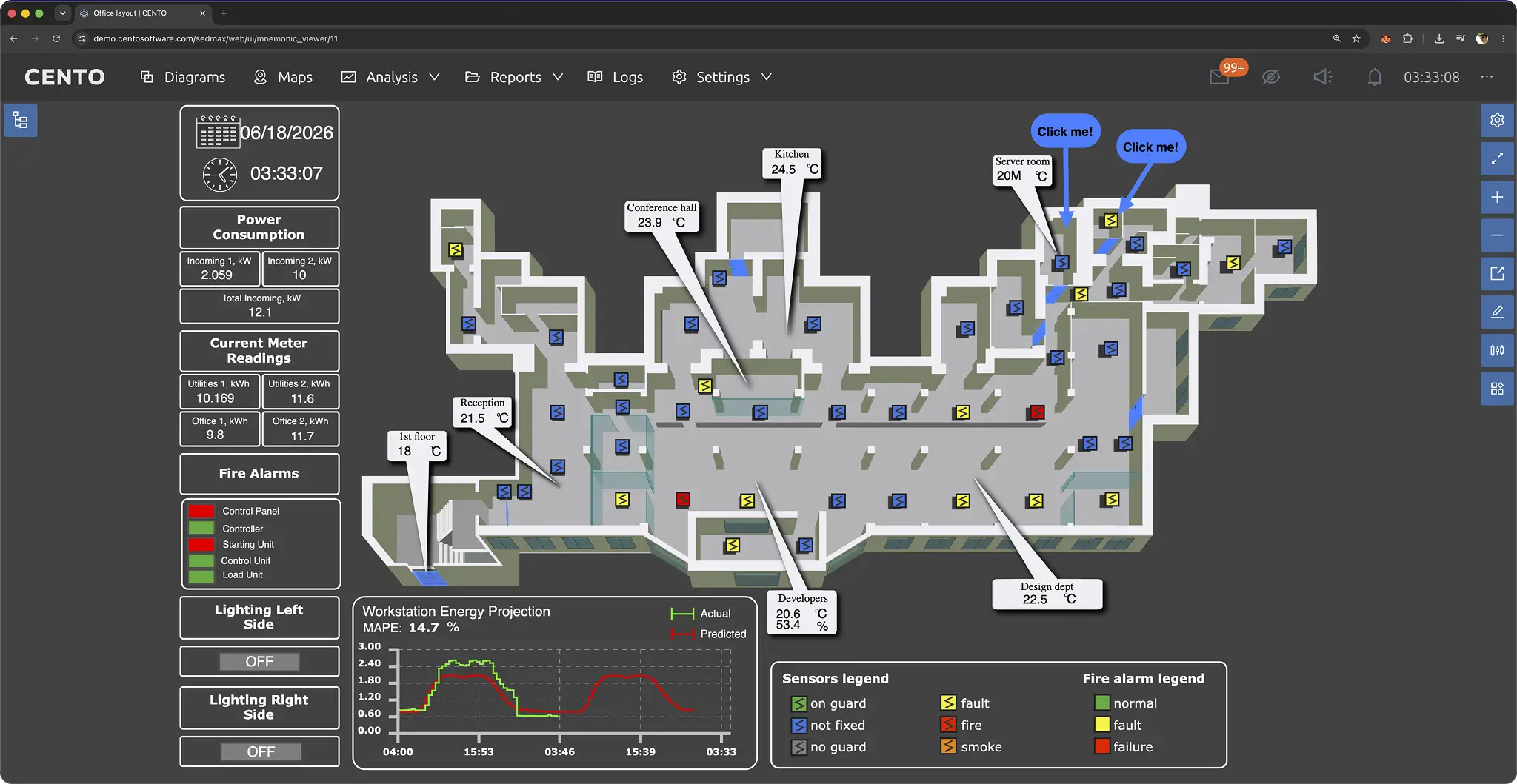
CENTO’s official documentation says its platform provides browser access and integrates with existing SCADA, MES, and ERP systems. Teams can evaluate web-based CENTO SCADA using representative roles, displays, alarms, protocols, commands, sessions, network conditions, and recovery cases from the decision matrix. [6] [7]
Review the stated secure IIoT architecture against the applicable IEC requirements and project risk assessment. A guided CENTO demonstration should show normal and degraded behavior, not only interface design. Launch the demo or contact CENTO for an architecture walkthrough based on the plant’s actual boundaries.
Frequently asked questions
What is the difference between web-based and traditional SCADA?
Web-based SCADA delivers selected interfaces through browser technology, while traditional SCADA commonly uses installed clients. The distinction does not determine where servers, data, or control functions run. Compare the full architecture, including engineering, identity, networks, failure behavior, recovery, and lifecycle maintenance.
Is web-based SCADA the same as cloud SCADA?
No. Web-based describes interface delivery; cloud-hosted describes service location. A browser can connect to an on-premises server inside a plant network. A hosted application may still use local gateways and controllers. Specify client, server, data, identity, and control locations separately.
Does browser access make SCADA less secure?
Security depends on the design, configuration, operation, and risk context rather than the browser label alone. Web access requires authentication, authorization, session control, endpoint governance, certificates, segmentation, logging, monitoring, backup, and recovery. Evaluate these controls against applicable IEC requirements and site-specific threats.
Can deterministic control run in a browser?
Browser delivery should not be used as a reason to move deterministic or safety functions. Place each function according to its timing, availability, safety, and failure requirements. Supervisory viewing and commands differ from controller logic. Any control change requires the applicable engineering, validation, and management-of-change process.
What happens if the network connection fails?
The answer depends on server location, network design, local control, redundancy, cached state, session behavior, and operating procedures. The architecture should define which displays, alarms, commands, and histories remain available. Test connection loss, stale data indication, reconnection, backlog handling, and recovery before acceptance.
How should a plant choose between the architectures?
Map each SCADA function and weight criteria such as endpoint maintenance, engineering, latency, offline behavior, failure domains, identity, remote access, recovery, integration, support, training, and cost. Test high-weight requirements with representative plant data and failure cases instead of selecting by interface appearance.
Sources
- Basem Elshafei, Jack C. Chaplin, David Sanderson, Svetan Ratchev. “Facilitating interoperability in manufacturing systems using digital twins: a multi-asset AAS system.” The International Journal of Advanced Manufacturing Technology. 2025.
- Keith Stouffer, Michael Pease, CheeYee Tang, Timothy Zimmerman, Victoria Pillitteri, Suzanne Lightman, Adam Hahn, Stephanie Saravia, Aslam Sherule, Michael Thompson. “Guide to Operational Technology (OT) Security, SP 800-82 Rev. 3.” National Institute of Standards and Technology. 2023.
- “IEC 62443-3-3:2013 — System security requirements and security levels.” International Electrotechnical Commission. 2013.
- “IEC 62541-2:2026 — OPC unified architecture — Part 2: Security Model.” International Electrotechnical Commission. 2026.
- Muhammad Muzamil Aslam, Ali Tufail, Haji Gul, Muhammad Nauman Irshad, Abdallah Namoun. “Artificial intelligence for secure and sustainable industrial control systems — A survey of challenges and solutions.” Artificial Intelligence Review. 2025.
- “What is CENTO and how it works.” CENTO Software.
- “SCADA control and monitoring system for industrial operations.” CENTO Software.